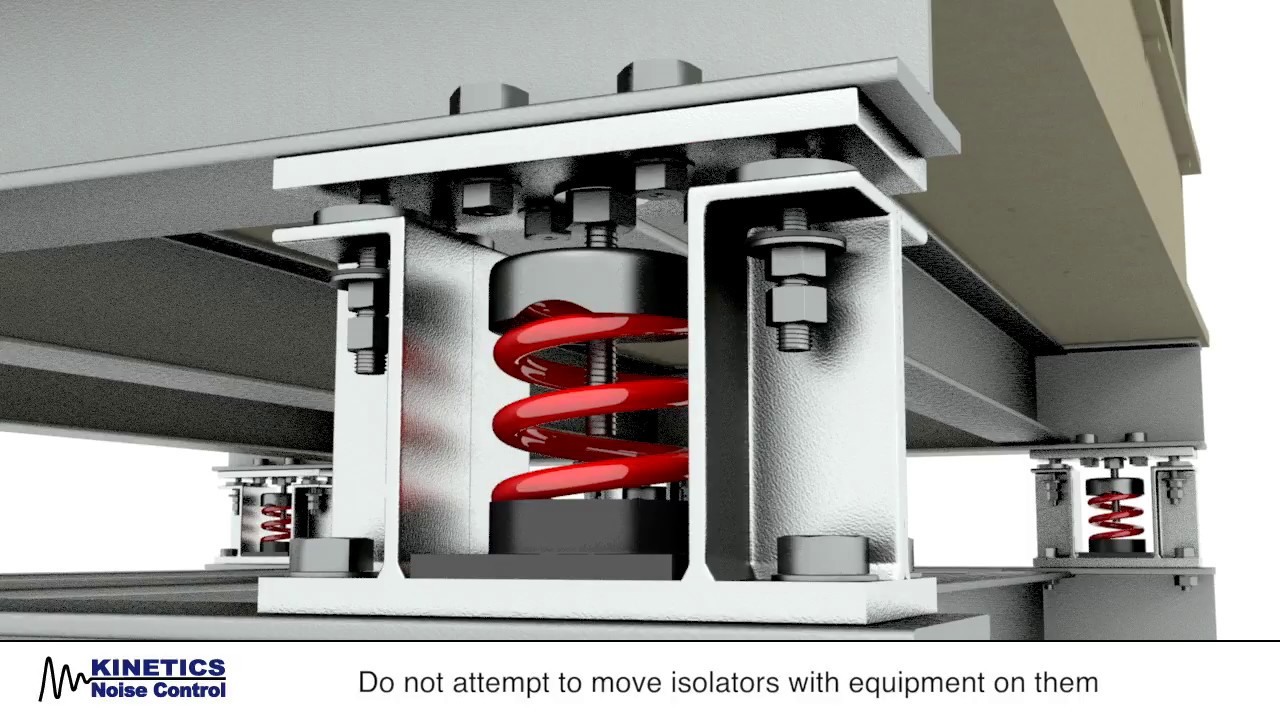
Seismic-restrained Isolators
The following is an edited response from ChatGPT. Resonant response of the equipment rack circuit boards should not be an issue, because circuit board fundamental frequencies are typically above 200 Hz, whereas seismic energy is mostly below 20 Hz. But electronic components may be affected in other ways.
The following points emphasize anchoring. A rack can be mounted via isolators and still be anchored using seismic-restrained isolators with snubbers or limit stops.
– Tom Irvine
1. Rack tipping / overturning
If a rack is not anchored or braced properly, ground shaking can cause it to tip or buckle. Once it starts moving, everything inside shifts and falls. For example, the support structure may deform, causing rails to bend or collapse.
2. Internal Movement
Even if the rack remains upright, the shaking moves everything inside: circuit boards, cables, servers, power supplies. Connectors can loosen. Power/cable disruption is a concern.
3. Cable / wiring strain, connector failure
When the rack moves, cables and power/ground connections are stressed. This can pull on connectors, loosen them, or create intermittent faults. The article “Protecting Telecommunications Equipment in Seismic Areas” highlights that accessories, racks, and cabinets help “minimize excessive motion that may cause undue strain on cable and network connections.”
4. Loss of service / downtime
Even if no physical destruction occurs, misalignment, contact loss, or power interruption can lead to equipment failure or shut-down. For critical equipment (data centers, telecommunications), standards like Telcordia GR‑63‑CORE require equipment to stay operational after the seismic event.
5. Rack structural failure
If the rack itself isn’t designed for seismic loads, the frame, mounting rails, or anchor points may deform or fail. This can cascade to internal failure of mounted equipment. For example:
“What problems arise in the server cabinet during an earthquake … various types of deformations occur … bends, twisting, stretching and compression.”
6. Floor or building movement / base isolation issues
Even if the rack is well mounted, building motion, floor vibrations, or resonance can amplify motion. Also, non-structural components (like racks) are required by building codes to be anchored or braced in many cases.
What to look for / how to mitigate
Given the risks, here are best practices and features to ensure the rack + electronics have a chance of surviving (and continuing to operate) in the event of an earthquake.
Anchoring / bracing
The rack should be firmly anchored to the floor (and/or wall) with appropriate seismic-rated anchor bolts or braces.
If the center of gravity is high (heavy equipment up top) or the rack is very tall, the risk increases. One article notes: “Any component weighing more than 400 pounds. … Or center of gravity more than 4 feet above the floor” triggers the need for anchoring.
lewisbass.com
Use floor anchors designed for seismic loads (shear and tensile rated).
Rack design and seismic rating
Choose a rack designed for seismic zones (many manufacturers offer “seismic server racks” or “NEBS/Zone-rated racks”). e.g., an article says “Seismic server racks protect servers by transforming potential disaster scenarios into manageable events.”
These racks include features such as reinforced frames, cross-bracing, base plates, and damping/shock absorption systems.
Look for compliance with standards like Telcordia GR-63 or building code (e.g., International Building Code (IBC) seismic requirements).
Internal load planning and mounting
Place heavier equipment (batteries, UPS, storage) low in the rack so that the center of gravity is low. One article: “… the distribution of equipment inside the cabinet in such a way that the center of gravity is closest to the bottom …”
Use locking rails, mounts and fasteners designed to hold equipment even under seismic motion.
Ensure cables are managed/restrained so they don’t pull out under motion.
Cable & power/wiring management
Secure power distribution units (PDUs) and wiring so they don’t shift, loosen or get pulled during motion.
Grounding and bonding: though more related to electrical safety than earthquakes, ensuring the rack frame is properly grounded ensures better safety and less risk of damage via stray currents. For example, one article points out ungrounded racks are a hazard.
Regular inspection & maintenance
Periodically check anchor bolts, brackets, vibration isolators (if any), cable restraints.
Check clearances: racks should not impede egress or maintenance even after motion.
Test or review the load: if new equipment added changed the weight drastically, the seismic rating/anchoring might need review.
Environment & room preparedness
Consider the room/floor itself: raised floors, floating slabs, etc can amplify motion.
Ensure that other non-structural items (lighting, ceiling tiles, emergency systems) are braced too — a rack might survive but surrounding damage could knock it offline.
Risk / downtime management
If equipment must continue to operate during/after an earthquake (e.g., for telecommunications, hospital systems), select racks and systems rated for continuous operation post-quake. For example: “Many data centres … where earthquakes are common … the standard states: ‘The equipment shall sustain operation without replacement of components, manual rebooting and human intervention.’”
Ensure backup or redundancy so that if one rack fails, the system behind it doesn’t fully go down.
See also:
Telcordia Technologies Generic Requirements GR-63-CORE: Bellcore_GR_63_Core.ppt
CEI.IEC 980, Recommended practices for seismic qualification of electrical equipment of the safety system for nuclear generating stations: CEI/IEC 980: 1989
IEEE Std 693-2005, Recommended Practice for Seismic Design of Substations: IEEE_693_sine_beat.pptx
IEEE Standard for Seismic Qualification of Equipment for Nuclear Power Generating
Stations: IEEE_std_344.ppt
📌 Related Earthquake Engineering Knowledge Hub
This article is featured in our main Earthquake Engineering & Structural Dynamics Hub . Visit the hub to explore related articles on shock response spectra, time history analysis, seismic equipment qualification, and structural case studies.